DeckForgeProduct story · 4 min read
A PDF deck you can work with again.
A browser presentation tool that turns PDF drawing instructions into editable objects, animation, and presenting workflows.
Read the case study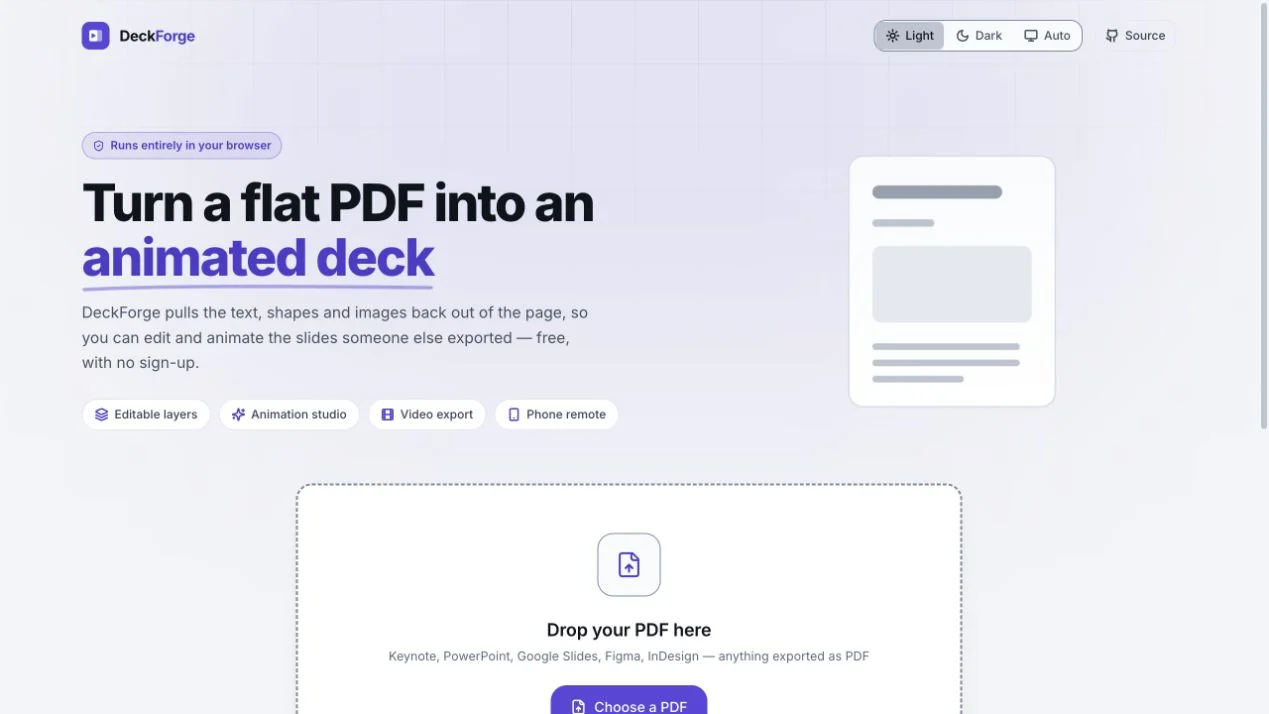
Original DeckForge starting screen for opening a PDF presentation. Editing and animation begin with an existing deck.
View full size ↗01 The problem
What does it take to recover something a presenter can actually work with?
A PDF preserves how a slide looks but usually loses the convenient objects a presenter wants to edit. DeckForge approaches that gap as a reconstruction problem: recover meaningful text, images, and vector objects, then let a person work with them rather than repainting a screenshot.
Designed for Presenter revising an existing PDF. Recognise editable content and control presentation pacing.
User context Design assumption
Making changes shortly before sharing or presenting a deck.
- The friction
- A recovered fragment may be selectable without being meaningful.
- Design implication
- Expose recognisable objects and explain editing limits.
Example situation · illustrative scenario. Imagine needing to revise one text block or animate one diagram, but having only the exported PDF. The visual is preserved; the convenient objects are gone.
02 The outcome
A slide that can keep moving.
I organised recovered slide content into recognisable objects that can be edited, sequenced, presented and exported. Some content remains an image, so the interface needs to explain what was recovered and what can actually be changed.
More about the experience
- A working reconstruction tool. The capture introduces the actual editor workflow.
- An honest fallback. Scanned or dense pages can remain usable raster layers.
03 The direction
Objects should be recognisable
Recognisable objects make editability useful. Text, paths, and images need to become meaningful layers rather than a pile of drawing instructions.
Product artifact · slide editing journey
My direction. I framed the journey around recognising an object, revising it, and presenting it, with an explanation when recovered content cannot be edited.
Process and product scope
I framed the editor around objects a presenter can recognise: a text block, a logo, a shape, or a chart. A technically selectable fragment is not useful if its meaning is unclear.
The flow needs to explain what can be edited, preserve a usable slide when recovery is limited, and distinguish live presentation pacing from an exported recording.
- Editable
- reconstructed page objects
- 40
- documented animation presets
- Browser
- core document processing
- Recover
Read text, paths, and images from the PDF.
- Group
Reassemble objects the person recognises.
- Revise
Edit and sequence meaningful layers.
- Present
Carry the same slide model into the talk.
04 Design decisions
Make the PDF’s editable parts understandable.
Open a decision to see the reasoning and trade-off.
01Make layers correspond to recognisable objects
Paths are grouped into likely logos, dividers, shapes, and chart series, while text is reconstructed into blocks.
Why this matters. An editable layer is useful only if the person recognises what it represents.
The trade-off. Object recovery is heuristic. Preserving appearance can be more valuable than forcing misleading editability.
02Let a presenter control the pace
Animations can wait for an advance action, while timed outputs play sequentially.
Why this matters. A live talk and an exported recording need different behaviour from the same slide.
The trade-off. That difference must be visible before export so the presenter knows what an audience will receive.
03Keep the core document workflow local
PDF reconstruction and editing run in the browser; phone pairing has a separate connection mechanism.
Why this matters. Local processing supports a lightweight workflow and avoids requiring a document-upload service.
The trade-off. Phone pairing still uses signalling, and some remote features exchange preview frames. The privacy explanation should distinguish those paths.
05 Reflection
Recover enough structure to make the next action possible.
I would use a difficult deck to test the explanation, not just a clean example. Someone should be able to tell why one element is editable and another is not, then choose a workable next step.
What I would evaluate next proposed work
- import a defined set of native-text, scanned, multi-column, and dense-vector PDFs; record editability and visible fidelity separately.
- revise a real slide and present it, measuring manual corrections and surprises between editor, audience view, and exported output.
Family connections with a source to follow.